How to reduce Google Chrome Memory Usage

Google Chrome is one of the most popular web browsers available today. Google Chrome is fastest browser compared to other browsers. The disadvantage of Google Chrome it takes more RAM usage compared to other browsers. For example if you have very low RAM then you cannot open so many tabs in Google Chrome, because when ever you open a new tab it takes more memory. Some times it consume so much RAM so that your system or PC may struck or restarts. For example if you open 7 tabs in Google chrome then you can see minimum 8 processes are running in the task manager with the name of chrome.exe ( 7 processes for Tab and 1 Process for Google Chrome Browser). You can reduce the memory usage by extension named "ToomanyTabs"


Steps to reduce Google Chrome Memory Usage


1.  Download and install "ToomanyTabs" in your Google Chrome Browser by clicking on this link.

2. once you installed the extension in your browser, you can see an icon at top right of your browser displaying number of open tabs.

3. Now click on this icon there you will get all the opened tabs in your browser, you need to click on yellow arrow mark to send the tab into TooManyTabs or you can also do this operation by right clicking on any webpage and click on "Send Tab to TooManyTabs" to send. This operation will reduce all the memory usage of RAM.


4. Now to get tabs in the TooManyTabs, click on the TooManyTabs icon in your browser. Just click on the tab which is in yellow color to restore.


If you have any Tech Doubts, Forward it to Kareem0488@gmail.com

How to take pictures of unknown persons who tries to access your system

Some times you may go away from your computer or laptop for some reason and you want to know who ever accessed system in yours absence. Mouse lock website provides this feature and sends you an e-mail with picture when ever some one access your computer.


How to take pictures of unknown persons who tries to access your system


1. Open Mouselock website by clicking on this link and login with your Google account.

2. Mouselock website asks you the give the permission for accessing your e-mail ,Click on Accept.


3.  Now you need to put a secret code (Number) which will be your unlock code. Click on any number.


4. Now place your mouse cursor in the slot and click, whenever any person moves the mouse then it will sent you a email with picture.

5. Now it is secured, You can go away from computer or laptop for any work. If any one accesses your system then you will get an email.


If you have any Tech Doubts, Forward it to Kareem0488@gmail.com

How to play any video while downloading the video

For example if you are downloading the very huge video file and there is no preview available in the website and you also want to know the audio and video quality of video file. This can be done  with the help of Internet Download Manager, you can watch or play any video while downloading the video. It is very useful for those who are downloading very huge video file which is having bad audio and video quality.


How to play any video while downloading the video


1. Download and Install the Internet Download Manager if you don't have in your system..

2. Now download any video file with the help of Internet Download Manager.

3. Open IDM(Internet Download Manager) from the task bar or from start menu.

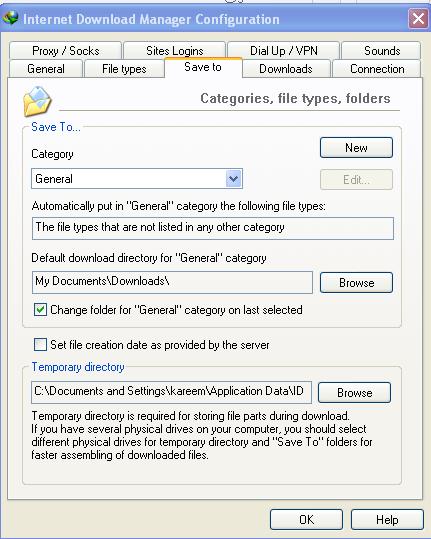
4. Now go to Options> Save to in the Internet Download Manager.


5. Now copy the path which is located in Temporary Directory and paste into Run Menu.


6. It will open IDM temporary folder, In that double click on DwnlData folder then open  your system username folder.


7. There you can see so many folders, Find out the your downloading folder by right click in the folder > Arrange Icons By > Modified.

8. Play the video with the help of VLC Media Player.


If you have any Tech Doubts, Forward it to Kareem0488@gmail.com

How to track real time flight status in map online

I already explained how to track train live status in online in my previous post( click here) and how to track unknown caller identity (click here)..In today's topic iam going to explain how to track real time flight status in online.This will be useful for those who want to find out the delays of aeroplanes and you can know what is happening in airport at home.


How to track real time flight status online


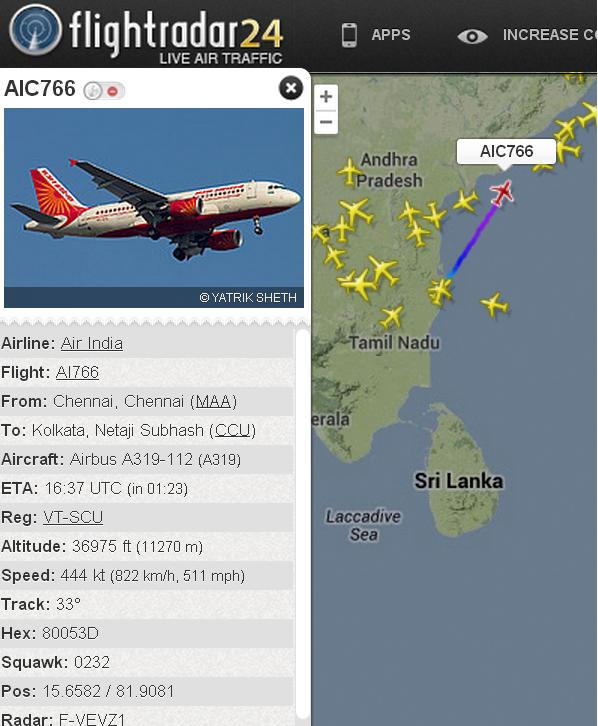
1. open Flightradar24 website by clicking on this link. Flightradar24 website shows real time flight live status around the world, they use automatic dependent surveillance broadcast technology to show real time flight live status.


2.  Just search the flight status in map by using name of the flight or airport at the left side of window...


3. Now you will see some flight icons, just click on any flight icon to get all the details of flight..


4. You can check real time flight status in your mobile or tablet by downloading the application from the given link

If you like my post like us on Facebook or follow us on twitter or subscribe us by E-mail  for regular updates..

How to get an Email when ever new video is uploaded in You Tube

If you don't have time to check You Tube for new video uploads of your subscribed channels. There is a feature in You Tube that sends an E-mail alert when ever new video is uploaded in You Tube. 

Steps to get an Email when ever new video is uploaded in You Tube


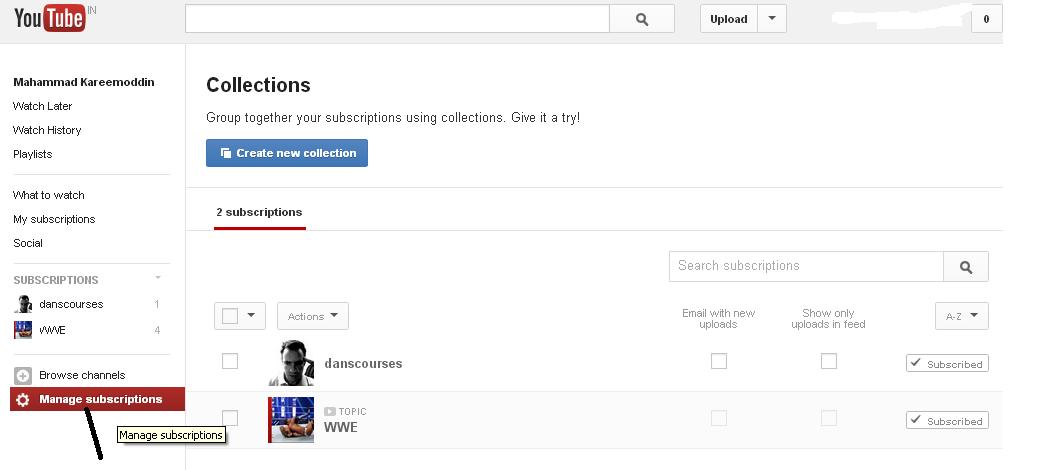
1. Login into You Tube with your E-mail address and password and click on "Subscriptions"


2. Click on Manage Subscriptions .


3. Now Select channel from which you want to get e-mail updates by checking the box of " Email With New Uploads" .


4. From now you will get email updates when ever new video is uploaded in your subscribed channel. 

How to fix "The device Generic Volume Cannot be stopped right now. Try stopping device again later "

Some times when ever you safely remove or unplug the Pen Drive or Flash Drive, you will get a error like that " The device Generic Volume cannot be stopped right now. Try Stopping device again later. If you unplug Pen drive from the computer even though when ever you get this error then it causes data corruption in USB drive. 

You will get this error mainly because of one or more processes  are running in the background of USB drive and your PC. So that windows operating system does not allows you to remove the USB drive as it causes interrupts the processes running in the background. Today in this topic i will explain how to fix this problem.


So many PC users shut down the system to solve this problem and remove the USB drive from the computer.  It will not cause any data loss in USB device because the processes running in the background will automatically ended when ever you shut down the system. If you don't want to shut down the system then follow the tutorial given below...

Steps to  fix "The device Generic Volume Cannot be stopped right now. Try stopping device again later "

1. Download Unlocker Software from the given link

2. Install the Unlocker software in your PC after downloading. Now double click on "My Computer" and right click on USB drive that you want to unplug and then click on "Unlocker".


3.  Now "Unlocker" Pop Up window opens consisting of lockable processes, click on "Unlock all " button to end all running tasks in background.

4. After that you can unplug or remove the USB drive safely from computer.


If you like my post like us on Facebook or follow us on twitter or subscribe us by E-mail  for regular updates..

How to find perfect printer for you?

If you are thinking to buy a new printer then you need to make some decisions such that want only black and white printing or color printing and you want features such as wireless networking.. Basically You need Standard Printer or Multi Feature Printer, In this topic i will explain what are the different types of printers available and how to choose perfect printer ...

Different Types of Printers


1. Ink Jet Printers: This printers are basic level of printers and some times you may get free Ink Jet Printer with new desktop PC. The cost of Ink Jet Printer is very low in the range of 1500 -3500. Ink Jet Printers are good for printing text as well as photos but cost of printing is very high in Ink Jet Printers. Ink Jet Printers are perfect for you if you have less printing work around 100 -200 pages and there is portable Ink Jet Printers available for Laptop.

Ink Jet Printer uses drops of ink to print images or text in a page. An Ink Cartridge contains ink that drops on to the paper when ever you need to print any thing. Ink Cartridge is a replaceable component in Ink Jet Printer. You need to clean this Ink Cartridge frequently because Ink Cartridges are more expensive..


Advantages: 

1. Ink Jet Printer's are low cost printers.

2. Ink Jet Printer is good for printing photos and allows you to print text in different colors.

3. Ink Jet Printers does not require any warm up time before printing.

4. Ink Jet Printers are easy to maintain because of flexibility and portability.

Disadvantages:

1. You need to replace and clean Ink Jet Cartridge frequently and it is expensive .

2. Ink Jet Printers are having slow speed compared to other printers and they are not suited for bulk amount of printing.

3. Ink Jet Printers having cost per one print is high.

2. Laser Printer : Laser Printers are good for offices because they can print in bulky amount. The cost of Laser Printer is very high compared to Ink Jet Printers but cost per print is low. Laser Printers are good if you are printing large amount of text and some times photos. Laser Printers works faster compared to Ink Jet Printers.

Laser Printers require Toner Cartridges instead of Ink Jet Cartridge, Toner Cartridges are expensive compared to Ink Jet Cartridges. The cost of Laser Printer starts from 5000 Rs and toner cartridge starts from 3000. 


Advantages: 

1. Laser Printers are good for printing black and white text in bulky amount.

2. Laser Printers having cost per one print is very low.

3. Laser Printers can print faster compared to Ink Jet Printers.

Disadvantages:

1. The cost of Laser Printer is very high compared to Ink Jet Printer.

2. Laser Printers require some amount of warm up time before printing.

3. Laser Printers are not recommended for graphic printing such as photos.It is good for only text based printing.

3. Photo Printer :A Photo Printer is specially used for printing photos and graphic related tasks. Photo Printers are useful when you frequently require printing friends or family photos on Paper. The cost of Photo Printer range starts from 10,000 Rs and whereas cost per photo is very high compared to Ink Jet Printers and Laser  Printers. The cost of Photo print for page is around 3 rupees per page.


4. All In One Printer or Multi Functional Printer: All In One Printer works as Fax Machine, Scanner , Printer and copier. It is good for small or large offices because offices requires all this components instead of buying a component individually you can buy All in One Printer for all this tasks. The cost of All In one Printer starts range from 5000 rs which is low compared to Photo Printers.


Conclusion: Ink Jet Printers are recommended for Students and home use those who prints photos as well as text. Laser Printers are recommended for offices and Photo Printers are recommended for those who want to print large amount of photos. An All In One Printer is recommended for lager organizations or business.

If you like my post like us on Facebook or follow us on twitter or subscribe us by E-mail  for regular updates..


How to detect Fake Pen Drive Before Buying

Now a days Pen Drives are mostly used for Transfer of data from one computer to another and for storage purpose. There are so many Pen Drive's available in market some of them are genuine one where as most of the pen drives are fake one. It is very much difficult to find out which one is original and fake one because fake one is also looks like original one. In today's topic i will explain how to detect fake Pen drives or flash drives before buying....


How to detect Fake Pen Drive Before Buying


1. Do survey in online : Before going to buy any flash drive or pen drive, first of all do research in online which Pen drive Product do you want to buy( Kingston or Transcend). Check the website of that pen drive manufacturer for correct name and Picture of the pen drive. 


2. Price of Flash Drive : This is one of the easiest way to find out whether the pen drive is fake or not. If you are getting 32 GB pen drive or Flash Drive at the same price of 4 GB then the pen drive or flash drive is a fake one. Don't Buy Pen Drive or Flash Drive from road permit shops and unknown persons.


3. Warranty : If the Shop dealer is not providing warranty for the Pen drive,then don't buy  because every pen drive company is providing warranty with pen drive. Don't buy the Pen drive from the shop if they don't have the refund policy.


4. Check the Model Number of the pen drive : You must check the Serial Number and as well as Model Number before buying the Pen drive. If you are not able to see the Model Number and Serial Number then it is a good indication that is a fake pen drive. You can verify the Pen drive with the help of Serial Number and Model Number.


5. Test the Pen Drive : If you already buyed the pen drive and having the refund policy then test the pen drive first day only with the help of software such as H2Testw . Check the transfer speed when ever you are copying large files and also check whether the given pen drive is formatting or not...

If you like my post like us on Facebook or follow us on twitter or subscribe us by E-mail  for regular updates..