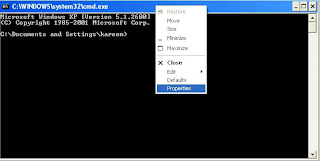
How to change the color of command prompt

Are you bored using command prompt in Black color and want to change the color of the command prompt, follow the below steps to change the color of the command prompt.

Steps to change the color of command prompt


1. Open command prompt by using Run menu and type cmd in text box .


2. Right click on command prompt name and select Properties.


3. Select colors tab in the Properties window.

4. After that select your color in which you want to use command prompt and click on OK, a new pop up box appears when ever you click on OK asks you to save this setting for this time or future use also.


5. From now you can use command prompt in different color.


What is cloud storage and need of cloud storage?

Yes we can increase the hard disk space up to 100 GB without buying new hard disk or any external hard disk. It is possible with the help of cloud storage.Cloud storage means storing the files in online. Cloud storage is the place where you can store all your data including pictures,documents and videos with high security compared to hard disks.


Advantages of Cloud storage


1. High security compared to offline storage in the hard disk.

2. If your computer hard disk files corrupted by virus or due to any malware's then you need to perform formatting of your system or you can lose the data because of virus in your system.

3. If you store the data in cloud storage, then you can access it from any system or any where in the world.

4. You can share file which is stored in cloud storage easily with anyone.

5. You can access the files by using any device such as mobile,tablet,laptop and desktop.

Disadvantages of Cloud storage

1. One of the main disadvantage of cloud storage is Internet Connection is required.

2. If your Internet speed is very slow then it takes so much time for downloading and uploading files or data in cloud storage.

3. Most of the Cloud storage providers gives very less storage for storing data or files freely..


How to download You Tube videos in Android Mobile

If you are watching so many videos in You Tube,some times we don't have Internet connectivity and we want to watch You Tube videos instead of that you can download the You Tube videos in Android mobile by using Tube Mate application in your mobile. Tube Mate application allows you to download You Tube videos in so many formats and features of Tube Mate listed below

i. Downloading You Tube videos in so many formats(FLV,MP4,MP3..)

ii. Allows to download You Tube videos in different resolutions.

iii. Resume capability and download You Tube videos at fastest speed.

iv. While downloading videos, you can also watch videos on You Tube.


Steps to download You Tube videos in Android Mobile

1. First of all download the Tube Mate application from this link

2. After downloading the application from the link then install the application in your mobile.


3. After installing the application in your mobile, open the application in your mobile from your applications list.

4. Now open any You Tube video in the Tube Mate application, you can see Green arrow in the down side when you select a particular video to download

5. Click on Green arrow to download You Tube video, It will ask whether you want to watch or download. Click on Download to download the You Tube videos..

6. Once you click on Download button, It will ask the resolution of the video and format of the video to download.

7. After that your You Tube video is downloading...

How to find out pending friend requests on Facebook

In Facebook you may have sent too many friend requests to your friends or relatives. If you want to check who does not accepted your friend request in Facebook. In this topic i will explain how to find out all pending friend requests in one place...

Steps to find out pending friend requests on Facebook

1. Login into your Facebook account.

2. Now click on this link http://apps.facebook.com/friendrequests/.

3. It will open friend request page and asks you "Pending Friend Requests would like to access your public profile, friend list and friend requests.", Click on okay button to accept.

4. Once you click on okay button then it will open Pending Friend Requests application in your Facebook account.

5. Now click on "Bulk Load" button, It is going to open another page in the same window.


6. Now click on "Get Friend Request Data", afterthat a small pop up window opens, copy the all  text in that by using Ctrl-A and paste into Load Friend Requests text box by using ctrl-v.

7. Once you click on Load Friend Requests button, it will show all your pending friend requests in Facebook.


Like us on Facebook................

What is the difference between Resistive and Capacitive Touch Screen

Now a days most of touch screens are coming with two types of technologies, they are....................

1. Resistive Touch Screen.

2. Capacitive Touch screen. 

In this topic i will explain which type touch screen technology to choose while buying smart phones.The basic difference between these two technologies is how they responds to your finger commands or stylus commands.


Difference between Resistive and Capacitive Touch Screen


Resistive Touch Screen: 

1. Resistive Touch screen made by using three layers, in these three layers, plastic and glass layer plays important role.

2.Both this glass and plastic layers placed opposite to each other with air gap between them,When you touches on the screen this two layers conduct with each other and current flow occurs..

3. It is cheaper compared to Capacitive Touch screen.

4. Resistive Touch screen is old technology and it is easy to use with the help of stylus, fingers and pen.

5. The disadvantage of Resistive Touch screen is, it is not visible in sun light area and it is easily insecure to the scratches compared to Capacitive Touch screen.

Capacitive Touch Screen:

1. Capacitive Touch screen is made by using glass layer which is coated with the help of material.

2. working of the Capacitive Touch screen is different from Resistive Touch screen, it is highly sensitive to human body compared to Resistive Touch screen.

3. Capacitive Touch screen is costlier compared to Resisitive Touch Screen.

4. Capacitive Touch screen is a new technology and  it does not work with the help of stylus, pen, nails compared to Resisitive Touch Screen.

5.  Capacitive Touch screen is visible in sun light area and it supports Multi touch screen feature.


Conclusion: Resistive Touch screen is having low cost and less sensitive compared to Capacitive Touch screen which is highly sensitive. The main advantage of Resistive Touch screen is, we can use it with the help of stylus or pen or fingers, where as capacitive touch screen does not work with the help of stylus.


If you are interested to use touch screen mobile only with the help of fingers then use capacitive Touch screen, if you want to use stylus or pen then you need to use resistive touch screen mobile. If you are already having touch screen mobile then you can find out whether your touch mobile is capacitive one or resistive one with the help of this trick. If your touch mobile is working with the help of stylus or pen then your touch mobile is resistive touch mobile, if your phone is not working with the help of stylus then your mobile is capacitive touch screen mobile.

Like us on Facebook friends............

How to get Facebook User ID easily

How to get Facebook User ID easily


1. Login into Facebook with your username and password....

2. Click on Your profile picture or profile name in the Facebook.

3.Now you can see your username in the address bar of the browser like this....

https://www.facebook.com/username

4. Now remove http://www and add graph in the address bar then the url becomes like this...

graph.facebook.com/username

5. After that you can see your Facebook User ID in the webpage and other details....

Like us on Facebook...........

How to disable or enable USB ports on your system

I already explained how to disable USB ports on your system in my earlier topic, you can check here. In this topic iam explaining another way to disable or enable USB ports on your system.


Steps to disable or enable USB ports on your system


1.  Right click on My Computer and select Properties.

2. It will open System Properties window, in that select Hardware tab.

3. Then click on Device Manager , it will open Device manager window , in that expand Universal serial bus controllers.

4. There you can see a list of USB Root hubs, if you have 4 USB ports then you can see 4 USB Root hubs in the list.

5. Right click on USB Root hub and select Disable to disable the USB port, like that you can disable all the USB ports by disabling USB Root hubs.

6. From now all the USB ports in disabled mode, If any USB device such as Pen drive or Memory card inserted into USB port, it will not work.

7. In order to enable the USB ports,Right click on USB Root hub and select Enable to enable the USB port.

Like US on Facebook...............

How to protect your computer drives without using any software

Some times you don't want unauthorized access to computer drives such as Local disk C:, D:,E:.F. In this tutorial i will explain how to prevent unauthorized access to your computer drives without using any software.

Steps to protect your computer drives without using any software


1.  Click on Start Menu> Run > Type gpedit.msc in the text box.


2. It will open group policy editor in a new window, Now go to User Configuration in the right side of the window.


3. In the User Configuration > Administrative Templates> Windows Components> Windows Explorer.


4. In the right side, you can see task list, in that right click on "Prevent access to drives from My computer" and select properties.

5. In that select enabled option after that you can select drive that you want to prevent from unauthorized access in the drop down menu.


6. click on Apply and OK to save the settings. From now onwards if any one try to open drive gets a message that drive is in restrictions...


Like us on Facebook..........